Notification Bot for LINE
1. Project Overview
A notification bot for LINE that sends daily reminders for class tasks and events. The bot is built using both Python and Microsoft Power Automate.
2. Key Features
- Auto download reminders to a .csv file before each message.
- Checks reminders for the next day as well as three days in advance.
- Automatically sends reminders to a LINE group chat at a specified time.
- Also includes the class schedule for the next day.
- Finally, appends weather information for the next day, courtesy of Central Weather Bureau RSS feed.
3. Technical Details
This project was developed using Python for downloading the reminders, and Microsoft Power Automate for sending the messages to the LINE group chat. The bot is hosted on a Windows Desktop running 24/7, with the task scheduler running the Python script at the specified time.
- Python: Used to download reminders from the Google Sheets API and save them to a .csv file.
- Microsoft Power Automate Desktop: Used to send the reminders to the LINE group chat at the specified time.
- Git: Used for version control and easy updates.
- Windows Task Scheduler: Used to run 'git pull', the Python script, and the Power Automate Desktop flow at the specified time.
- LINE Desktop: Used to send the reminders to the group chat.
4. Development Process
The project started beacuse I noticed that many classmates, including myself, often forgot about assignments and events. I decided to create a bot that would send reminders to our LINE group chat every day.
Step 1: Research & Planning
I initially researched online and found IFTTT.com, but using the LINE Notify API with it requires a paid account. I didn't want to pay for it right away as I believe there must be an alternative to it.
To my surprise, I did actually found a free alternative to it, which is Make.com! This is not a sponsored promotion lol.
Although Make.com does have paid tiers, their free tier is more than enough for my use case. What's more, it requires no coding at all! It's all essentially just connecting dots and filling out blanks!
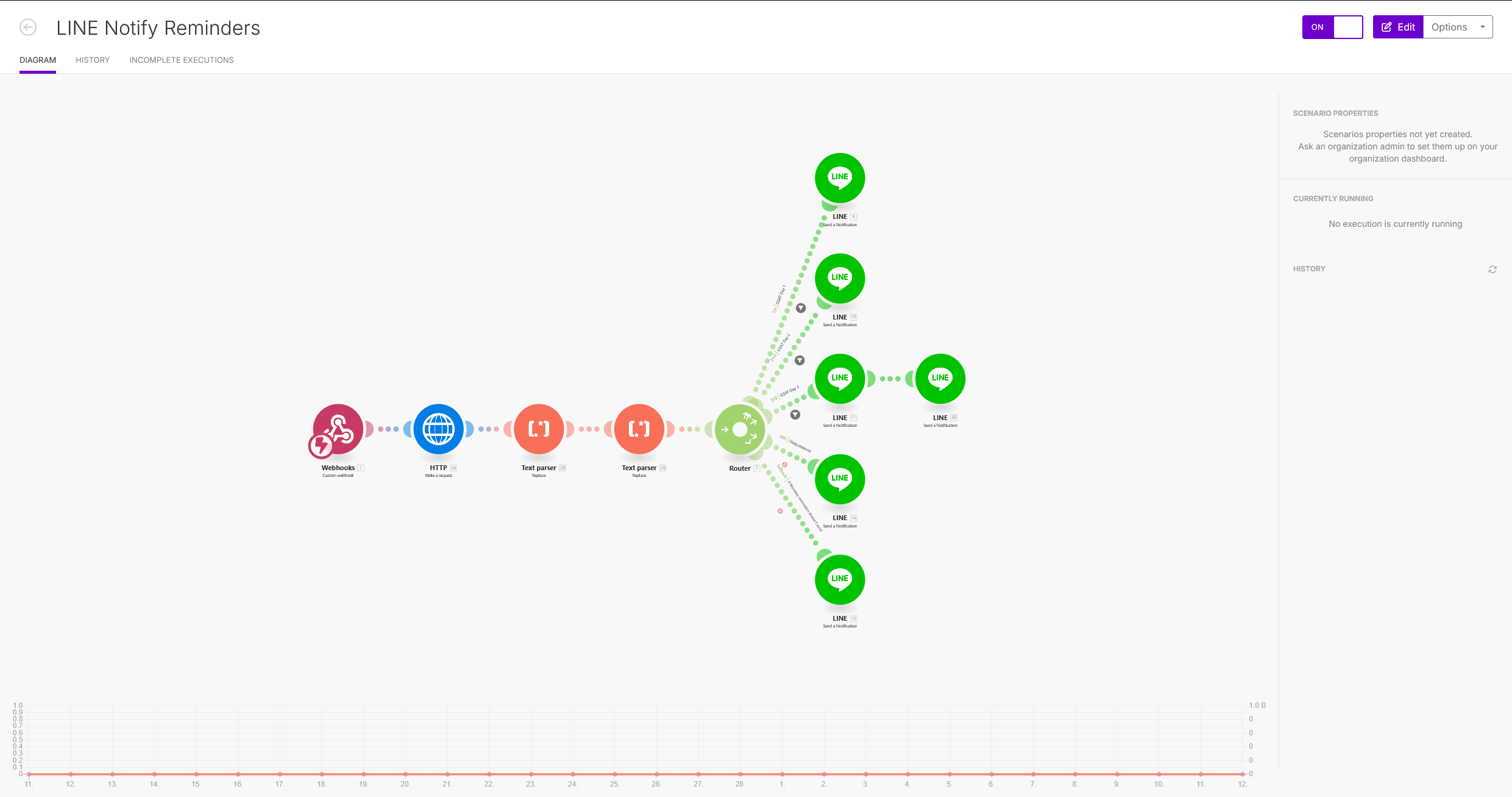
Make.com Interface Image Click the image to zoom in!
Step 2: Development
After finding the platform, I started to develop the bot. Because I aim to make it possible for anyone in my class to add reminders to it, I decided to use a shared spreadsheet as the reminders database.
Since most of my classmates are not tech-savvy and only used Google products, I decided to use Google Sheets as the database. Besides, Google provides a easy to use API for it, which makes it easy for my bot to programmatically access the data.
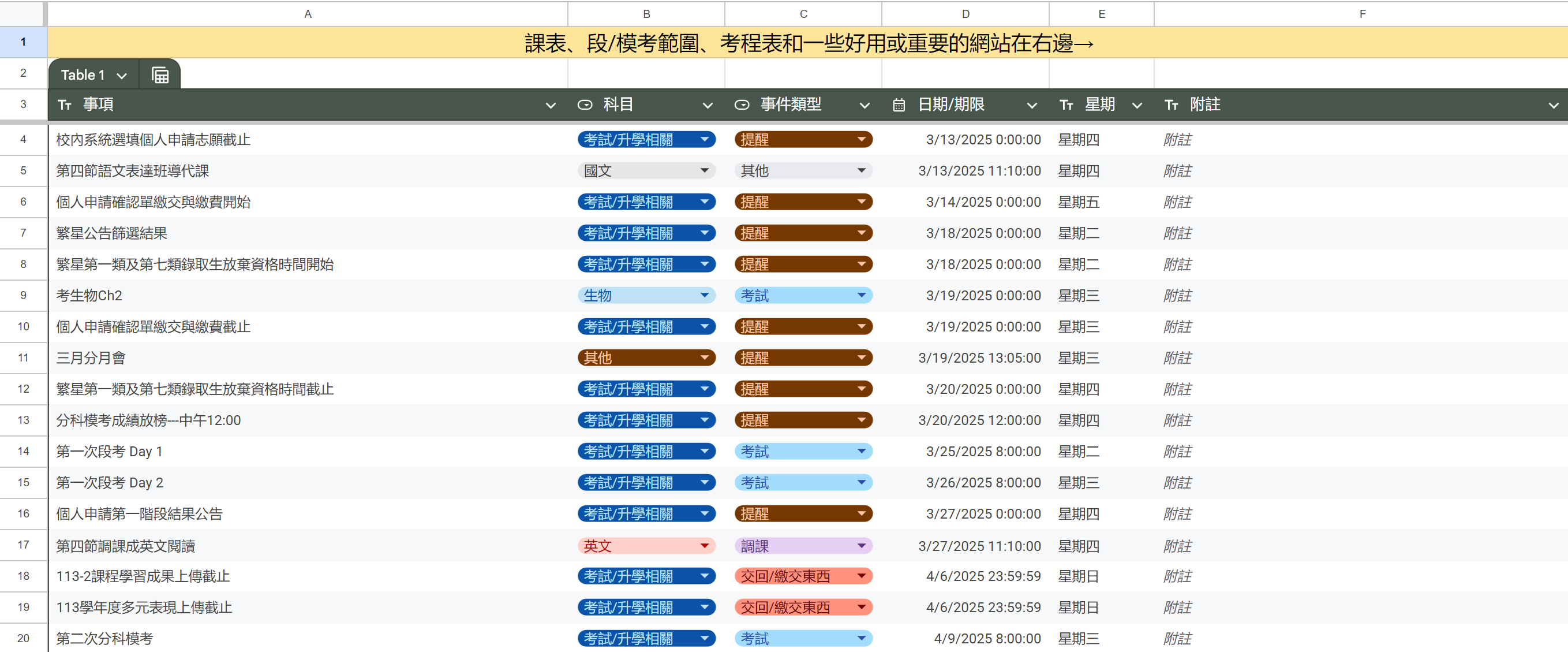
Reminders Database Image Click the image to zoom in!
Then, I started to find ways to send the reminders to the LINE group chat. I found that Make.com has a LINE Notify integration, which allows me to send messages to the group chat as a LINE Notify message.
Afterwards, I started to develop the Python script that downloads the reminders from the Google Sheets API and saves them to a .csv file. I also developed another script that handles reminders checking and sending the message to Make platform.
Finally, after a bit of trial and error, the first version of the bot is up and running, scheduled to send a message at 10:00 P.M. everyday!
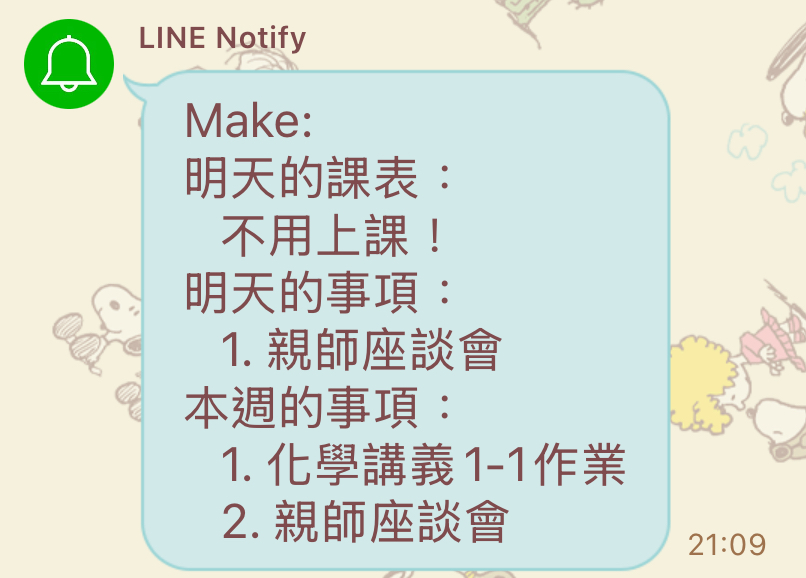
The first iteration of the notification Click the image to zoom in!
Step 3: Feature Enhance
Reduce Reminders
The first iteration of the bot sends the Class schedule, Reminders for tomorrow, and Reminders for the week.
However, I quickly foundout that this is going to cause problems very soon. Since the Notify message has a limit of 1000 characters, if the reminders are too long, the message will fail to send completely. What's more, I want to keep it to be one message per notification, so splitting the reminders for the week to another message isn't an option.
Therefore, I decided to reduce the reminders to just Reminders for tomorrow and Reminders for the next 3 days. This way, the message will be shorter and more concise.
Weather Information
After reducing the reminders, I feel like appending some weather information to the message would be a nice touch. Therefore, I started to look for a weather API that I can use.
After some searching, I found that the Central Weather Bureau of Taiwan provides a RSS feed that contains weather information for the next day. Most importantly, it's free of charge! I decided to use this feed to append the weather information to the message.
After some trial and error, I successfully appended the weather information to the message. Now, the message contains the class schedule, reminders for the next 3 days, and the weather information for the next day!
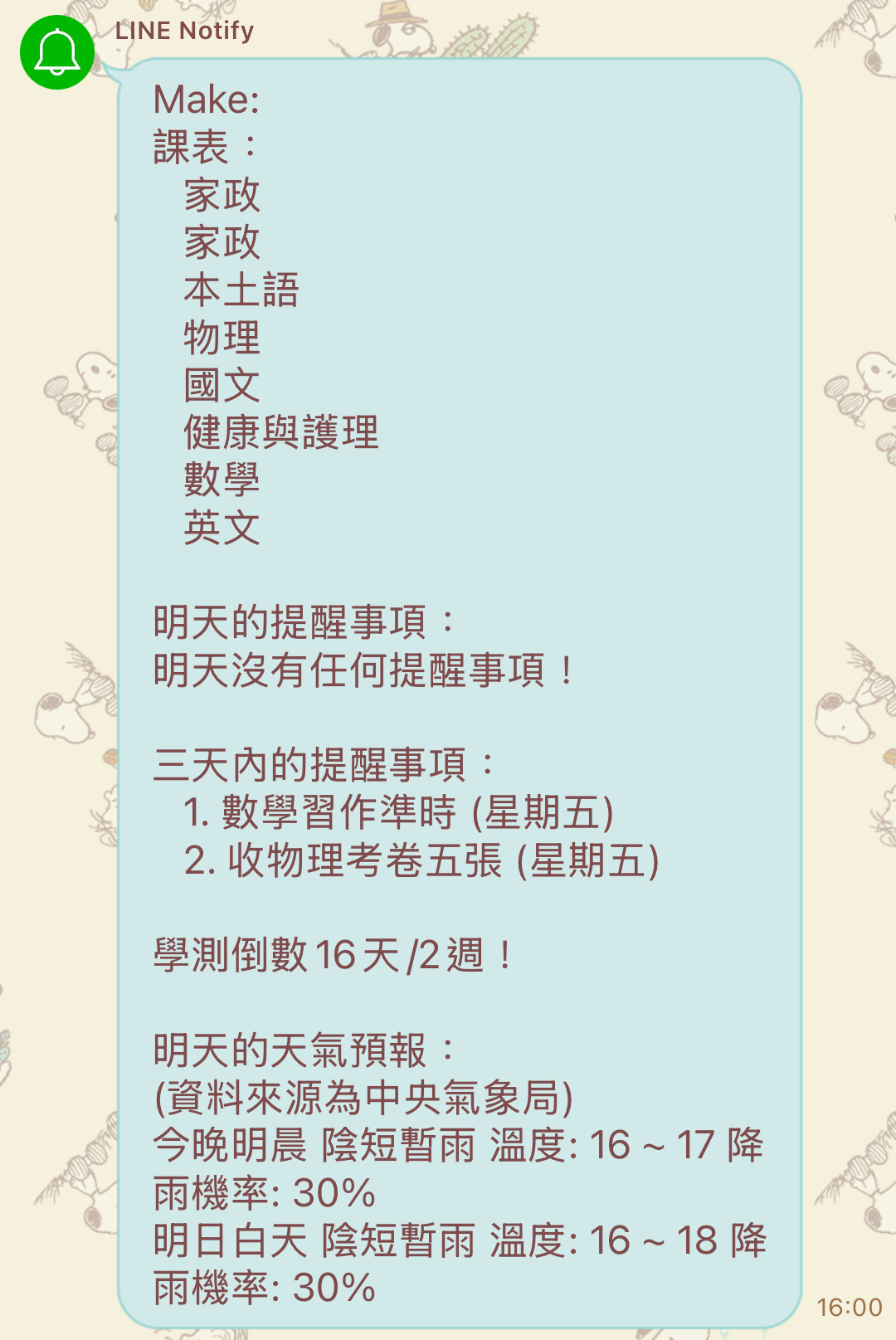
The improved notification with weather information Click the image to zoom in!
Step 4: Service Transition
After the bot is up and running stably, I received an unfortunate news that LINE Notify is going to be discontinued in March 2025. The only alternative to it is by using the LINE Messaging API, which requires a paid account for my use case.
Therefore, I started exploring once again for alternatives. Since the notification needs to be in LINE, I have no choice but to use the LINE Desktop app, and make the bot send messages from my account instead.
In order to achieve this, I decided to use Microsoft Power Automate Desktop to design a flow that automatically sends the message to the LINE group chat at the specified time.
After some trial and error, I successfully created the flow and the bot is now sending messages from my account instead of LINE Notify!
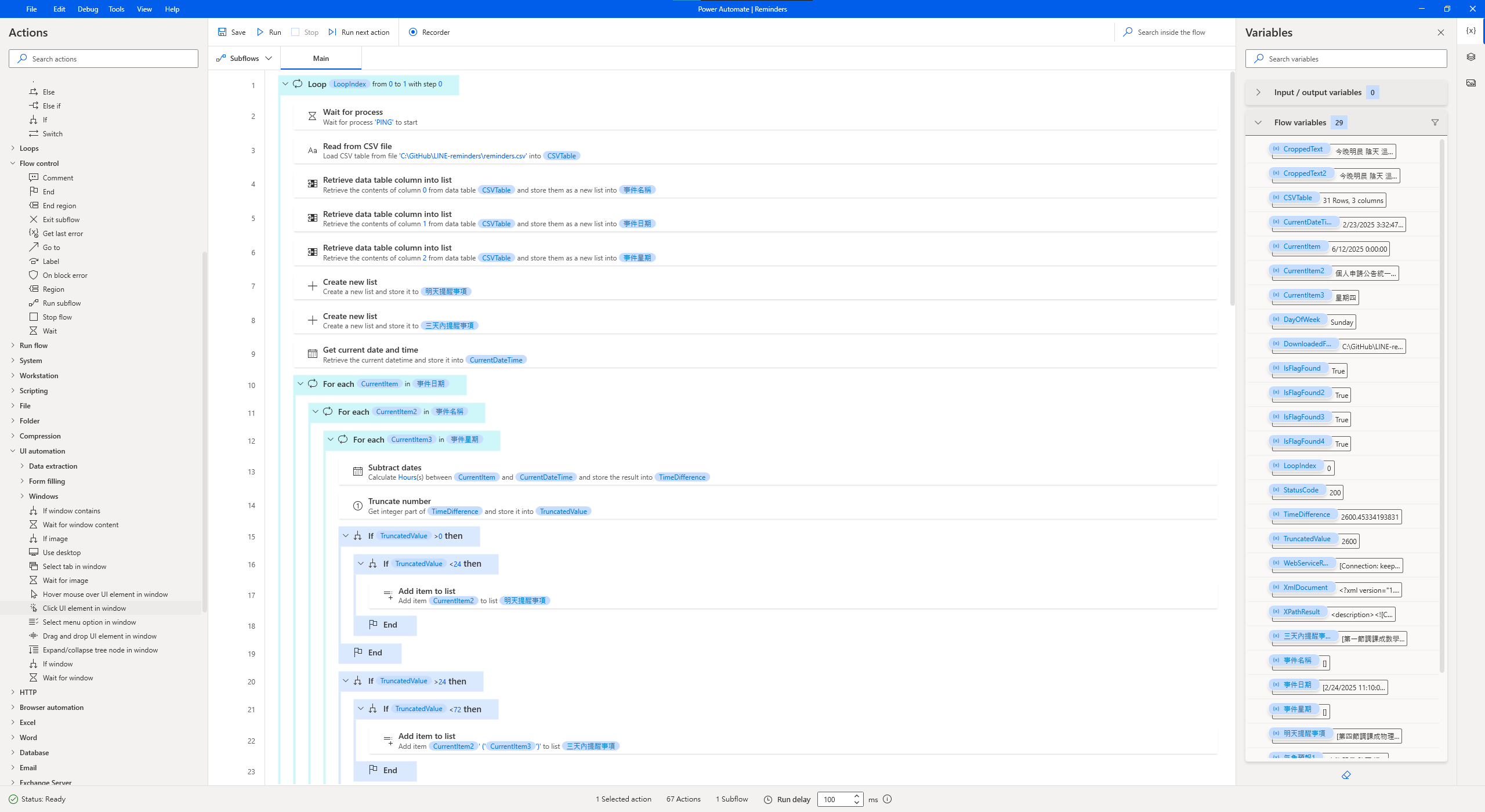
The Power Automate Desktop flow that sends the message Click the image to zoom in!
Outcomes & Lessons
This project is the first time that I actually created something that is not only useful to me but also people around me via coding. It's a great feeling to see that the bot is actually helping people to remember about their assignments and events.
I also learned a lot from this project. I learned how to use the Google Sheets API, how to use Make.com, how to use the Central Weather Bureau RSS feed, and how to use Microsoft Power Automate Desktop. I also learned how to use the Windows Task Scheduler to run scripts at a specified time.
Most importantly, I learned that there probably is a free alternative or workaround to a paid service. It's just a matter of time and effort to find it. I dont need to start paying for a service right away just because it's the only one I know.